Tuesday, October 30, 2007

Leopard: BSOD as PC icon


This is simply classic... what a good laugh! This is the icon for PCs on a network in Leopard.
It's a CRT monitor displaying a Win98 blue screen of death!

Is this taken a bit too far for a professional worldwide OS? Or is it just a harmless joke at Microsoft?

You decide. But for now, just take a good laugh.

Leopard: Now shipping with free blue screens

It seems that Leopard could have done with more beta testing before the launch day, because immediately after users bought Leopard to install on their Macs, serious and even laughable problems have surfaced.

We all are aware of the infamous blue screen on PCs, but apparently, Leopard does throw up a blue screen when it's unhappy too! Unbelievable? Read the crn article here. The article reads that "Apple is confirming that some installations of its Leopard operating system have left a Blue Screen of Death, and recommends the OS be reinstalled or installers use "line commands" to get the systems booting properly. "

After completing an upgrade installation of Leopard and restarting the computer, a blue screen may appear for an extended period of time, claims Apple who has admitted to this glitch.

The reason for this? Apple says that "you may have third-party "enhancement" software installed that does not work with Mac OS X 10.5 Leopard. "

Thankfully, a workaround has been documented here for affected users.  

I'm disappointed, really. This isn't the OS X we've come to know about, but I guess it's the direct result of pushing for an early launch date before sufficient testing was done. Even before 1-2 weeks of the launch, Leopard had yet to acquire GM status, and that was scary. I can only hope that Apple will permanently fix this fast and my advice is to do a full system backup before upgrading from previous versions of OS X to Leopard. Apple should have released a tool like the Vista Upgrade Advisor so that these problems can be identified before the installation is done and users can uninstall the incompatible software before proceeding with the full Leopard installation, that'd be thoughtful!

Argh... utterly unacceptable, Apple!

Sunday, October 28, 2007

Leopard: The ratings

In order to help you decide if Leopard is worth your buck, I have decided to rate this new OS from Apple, using what I call the "Finder heads"!

I don’t believe in one single rating, especially for such a major product like this, because different users come from different backgrounds and hence will come to different conclusions as to how good Leopard is (this is what I said in my podcast). Some users wanting to use Leopard might be PC users, or existing Mac users, and these two groups of consumers will come to rate Leopard very differently, thus one rating just isn’t sufficient.

Broadly, I can classify users wanting to purchase Leopard into 4 groups:

1) Existing Mac users (OS X 10.4 “Tiger”)
2) Longtime Windows XP users
3) Windows Vista users
4) Generic Linux users (e.g. Ubuntu, Linspire)

Now let’s rate Leopard based on these 4 main categories, and you’ll realise, my ratings would be very different!

For existing Mac users (OS X 10.4 “Tiger”)
Rating:
2.5/5. I’ve said before, Leopard is a minor upgrade and if you’re currently using Tiger, Leopard isn’t going to be wham-bang fantastic and all that worthy of praise. Other than a few new important features like Time Machine and a revised Finder (and maybe Stacks), the rest are just minor upgrades and appearance changes, such as the new Dock. You’ll find that forking out S$238 is a bit pricey, and life would still go on even without Leopard. If I’m generous, 3/5. Nothing more than that.

For longtime Windows XP users
Rating:
5/5. Flawless. If you’re still on XP, and you switch to the dark side and take up Leopard, you’d be wondering why didn’t you switch earlier and rescue yourself from the countless security and reliability issues associated XP. To any XP user, Leopard is quite clearly superior in almost every way. The UI’s stunning, the platform is as secure as can be (because it’s unix), there are little problems, blue screens or error messages popping up now and then, and it’s so simple and easy to use! So for that, Leopard thoroughly deserves a perfect 5.

For Windows Vista users
Rating:
3.5/5. This is a little more tricky… I was contemplating between a 3.5 or a 4, because some features in Leopard are actually found in Vista, such as Time Machine, which is actually similar in concept to Previous Versions in Vista, and also the parental controls stuff… But Apple has sort of made things look way cooler than in Vista. For example, Time Machine looks so much cooler than Previous Versions, so based on that, you might want to slap a 4/5 on Leopard, but purely from a feature standpoint, I think a 3.5 would be more realistic.

For generic Linux users (Ubuntu, Linspire etc.)
Rating:
4/5. In terms of security (viruses/online threats), many Linux systems and distributions are about as secure as Leopard, because Mac OS and Linux are built on the same, rock-solid unix foundation, with Leopard being closed source but most Linux offerings being open source.

Leopard is superior to Linux in that it is more polished and mature, and the UI seems more coherent and pleasant as compared to, say, the colourful and amateurish KDE desktop environment. Compatibility should be better on a Mac than on Linux too, and of course, you don’t need to deal with codes and weird gibberish for you to run/install Leopard. Furthermore, because Leopard is proprietary software, you will have long term support from Apple and can be assured of constant quality software updates. On Linux, not all systems are LTS, and many assume a higher level of technical know-how on the part of the user, so Linux is for the geeks, but Leopard is for the rest of us.

Conclusion
I hope these few figures will give you a clearer picture of Leopard. In general, if I rate this thing 4 "Finder heads" and above, this product is absolutely worth your money and is a must-get! I give a 3-3.5 heads, then it's an average product. If you see less than 3 heads, think twice before paying!

Friday, October 26, 2007

Leopard: Comments on new features

It was an extremely sad thing that I didn’t actually get to see the countdown timer on Apple’s webpage at 0 days, 0 hours and 1 sec before the official release. Instead, I was eating sushi with Fang Lin, Serena and Althea at Parkway!

But anyway, I’m still happy that Leopard, the OS I had been waiting for for ages, is finally finally out, and at a price a hell lot cheaper than most Vista editions. But of course if you’re sharp, you would know that the price of Leopard and Vista are not directly comparable since Vista is a bigger leap from XP than Leopard is from Tiger and so it would naturally be that Vista warrants a heftier price tag. Leopard retails at S$238 for an individual license, but if you plan to deploy this cat on more than one Mac, the 5 license family pack is available for S$369. I find the price to be the major point of contention for us users. If this thing retailed at say 50 bucks lower, it would make a no-brainer update, but now that it costs a bit more than what is reasonable (I feel), it makes people think twice.

Price issues aside, I would like to comment a bit about the 10 new major features. Paul’s Win SuperSite provides comprehensive screenshots of Leopard here and it’s advisable to take a look before reading on.

1) New Desktop
The desktop has not undergone severe changes, and it is still, at first glance, identifiable as Mac OS X. My only complain here has to do with the half-transparent top menu bar which honestly looks disgusting, aesthetically. It picks up the colour of your wallpaper beneath it and can really look awfully bad if your wallpaper is of a single colour, like this one:


I would prefer if the menu bar just remained the same as Tiger. The new dock looks much better than Tiger’s, and who really cares if it didn’t make sense putting it up on the left or right of the screen! It looks gorgeous and 3D-like.

2) Finder
I absolutely love the fact that the new Finder is modelled after iTunes UI, but initially it may get a bit confusing which is iTunes and Finder when you do the Expose. I dislike the new blue folder icons, because I find them too bluish and lack colour, which makes it less interesting. Cover flow is cool, but the images take some time to load when scrolling through rapidly. Lastly, thank goodness they abandoned the brushed metal UI going for a more standardized window design with a simple gray gradient, it looks much more unified and pleasing to the eye.

For a screenshot of what I'm talking about, refer here.

3) Quick Look
I have no complains on this for now, it is an ingenious idea and should benefit everyone. It also challenges the conventional notion of launching an application to view a file. All in all, Quick Look is a convenient useful feature.

4) Time Machine
Haha… This is the feature that gets everyone talking. I still think, right up to this day, that the UI is super-duper amazingly crazy. I mean, a star field and literally going back in time in space?! But then again, this is so typical of the Apple we know, which is so obsessed over making things all hyped-up and cool by overloading excessive animation and graphics, with the emphasis of appearance and aesthetics over functionality and practicality. Not to say that the star field isn’t functional, but surely if Microsoft would to do such a thing, they would present this in the simple, unexciting form of a drop-down list to choose from or something of the like, but definitely not a crazy UI like Time Machine. I feel that the emphasis on UI is a tad too much, and it may be a better idea to use a conventional list instead, despite how usual it might be. But Apple being Apple, it’s their trademark to make things look ‘cool’ with a visual appeal, so I don't really blame them for doing an absurd UI.

5) Mail
I can’t say much about Mail, because I don’t use it on a regular basis (it’s only synced with my Gmail but I use Yahoo! as my primary email) and I don’t really care about the new additions to it as web-based email seems to be the way to go today and few people use such desktop email software like Mail or even Outlook Express.

6) iChat
Again, I’m opinion-less on this, simple because I don’t use iChat. I’m on Adium and Skype.

7) Spaces
Apple has made it seem as if they were the first to create something like Spaces with the concept of multiple desktops or workspaces, but in reality, Linux did that long time ago. For example, Linux Ubuntu currently features this, and so Spaces is not entirely original in concept. But I must applaud Apple for making this much better than that found on Ubuntu or anywhere else. Spaces is more polished, more elegant, and better managed than anything I’ve used.

8) Safari Web Browser
Nothing much to say about this too, just that I hope it crashes less frequently on Leopard.

9) Parental Controls
I don’t use this feature even in Tiger, so I have no comments on Parental Controls, but I’d like to add that Vista has such a thing too.

10) Boot Camp
Boot Camp on Leopard is no longer in beta, and it runs XP and Vista natively with drivers for most of the hardware on your Mac, for example, your Wi-Fi and iSight. If you need to run Windows within Mac, you should purchase Parallel Desktop instead for a minimal price.

So this is a brief rundown of Leopard for you just a few hours after the worldwide release. If you think you want to purchase this cat and the price is justified, I give you my assurance that Leopard is a top-notch, solid operating system that just works. If not, then sticking with Tiger is pretty fine. I’m leaving my iBook at Tiger after all.

Thursday, October 25, 2007

1 day to go...

I'm all excited about the Leopard launch... despite some things that I dislike regarding the way Apple markets Leopard, like giving the false impression to customers that it's a big major upgrade, but in actual fact, it's just a bloated "service pack". But whatever it is, it's still something for us Apple users to look forward to, and I'm excited because it's something new from Apple. You'd probably have noticed, I'm always excited about new products from Apple, even if it may not be flawless.

For the record: here's the countdown currently:

Also, tomorrow, iShop will be holding a special Leopard arriving party event at iShop, level 3 Orchard Cineleisure at 6pm. I should be there just for the fun of it, should have some freebies, and it should probably tempt you to part with $238 for a copy!

Monday, October 22, 2007

TUWP #9 - Does Leopard Open Up New Vistas?

The Unofficial Windows Podcast Episode #9

This week's show is a short one, but hey, it's a lazy Monday...

Topics covered:
- Mac OS X 10.5 Leopard VS Windows Vista: there is no basis for comparison! Both Windows and Mac cater to different people, meet different people's needs, and each are unique on its own. 300 new features or 10?
- Windows Live: linking multiple Live IDs + Windows Live Events

I'll be back next week to continue the special series!


Type: mp3
File size: 10.7 MB
Running time: 11:28
Date Recorded: Mon, 22 October 2007
Date Published: Mon, 22 October 2007
View feed


Add to iTunes (recommended)


[Get iTunes from Apple]
Visit Ian's blog at www.nai-oh.blogspot.com

Wednesday, October 17, 2007

Leopard: Thoughts before release


Is it just me or do you also think that the countdown timer on Apple’s homepage seems to fuel more excitement and urge you to pre-order a copy of Leopard?

Haha… Just before the ferocious Leopard is revealed to the world in about 9 days time, I have one thought which I would like to share with you.

Presonally, I feel that this release couldn’t have arrived at a worst time than now, frankly, considering the unpleasant recent series of events with the iPhone and update 1.1.1, which I believe has inflicted a certain amount of damage to Apple as a brand name, and with the current shaky reputation it has, Leopard might not be so well-received initially until consumer confidence restores back.

I mean, although those who jailbroke their iPhone may be a small community of users, but Apple must not forget that these are the “tech geeks”, the true genuine Apple supporters who will very willingly buy the next thing that Apple releases, so now that their trust in Apple has been shaken, it would affect their overall impression of Apple. And they aren’t going to keep quiet about everything, these guys have a voice, and if their unhappy, their gonna make some noise, and the rest of us users will be convinced to adopt a similar negative impression of Apple, well at least temporarily. And so, with this teetering situation Apple is in right now, involved in iPhone lawsuits, and even with the recent attack by environmental group Greenpeace on the environmentally unfriendly iPhone, the release of Leopard would take place against a less-than-ideal backdrop, and this may have implications on the initial adoption of Leopard.

Do you share the same sentiments?

Tuesday, October 16, 2007

Leopard: It's OFFICIAL!

It's on the Apple website this very moment I'm typing, it's official:
26 Oct is the beautiful day for Leopard release!
Thanks Weng for telling me!

Countdown! 10,9,8,7...

Apple has kinda dropped the veil of uncertainty, though not officially. The release date for Mac OS X 10.5 Leopard as according to an article on MacNN based on details from Apple retail stores all agree that THE date is 26th October 07. Nope, not the 23rd or 27th.

That's a close 10 days more! (Aren't you tingling in excitement?) According to the article on MacNN, "Apple has reportedly scheduled a series of launch events at 6 pm on the day of its release and plans to keep stores open until midnight as part of its launch, according to ifoAppleStore. "

The article continues, saying that it is uncertain if Leopard has been declared GM (golden master), the Apple equivalent of the Microsoft Windows RTM (release to manufacturing), but I speculate that GM should be out very soon.

I doubt that this release would be as grand as the iPhone launch, and I suspect it won't draw as big a crowd outside Apple stores as did the iPhone, for the simple fact that this isn't version 10.0. But nonetheless, Mac addicts would patiently queue up just to take home the new 64bit operating system which has been delayed by about half a year (don't worry, not 5 years).

I've been so patiently awaiting this moment to arrive, I waited past the Core 2 Duos to come out, the new iMac, Windows Vista, and now that Leopard is shipping in 10 days time, it's now the sweetest time for me to purchase a new desktop replacement, an iMac running Vista of course.

Countdown, today is 10 MORE DAYS TO LEOPARD!

Saturday, October 13, 2007

The great escapade

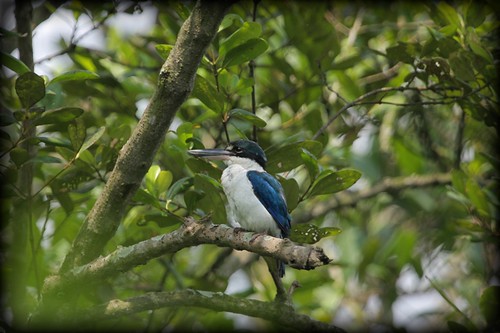
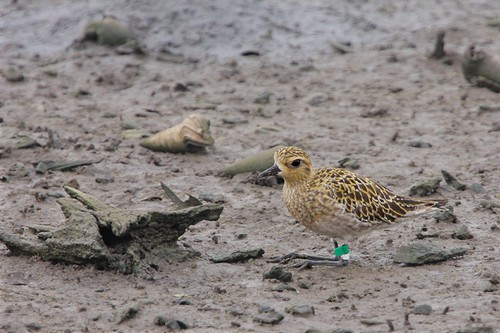
Alas, the exams are finally over, and while I can still enjoy before the results come in next week, I decided to make full use of time and catch up on photography. Today, along with my good buddy Samuel and his dad, we headed to Sungei Buloh nature reserve to do some wildlife photography, not exactly my forte and to my liking.

Today proved to be a wonderful eye-opener, we were there from early morning until noon when the lighting was harsh and the tide started to rise. Samuel, with his impressive knowledge about almost all birds there, introduced to me many of them, and it was a pure joy to be able to marvel at God's creation.

Wildlife photography proved to be extremely challenging at times, and it is a type of photography which requires good gear to get close to the subject. I brought along my cheapo Tamron 70-300mm, which proved not to be long enough to get those birdies far away, while Samuel used the monstrous EF 300mm f2.8 coupled with a 2X converter, and occasionally also a 1.4X added on. With a reach of more than 600mm on such a high grade lens, image quality was shocking and my Tamron felt like nothing beside it. We met some other photographers there with big lenses too, I personally got to touch and shoot with the Canon 600mm f4 on a 1D MarkII N which was the most satisfying thing to play with.

At times, some species of birds whiz past too fast to even aim and shoot, at times, the lighting isn't perfect, at times, the subject is too far away, at times, the fog/mist is too thick, and at times, the slightest movement causes it to scuffle off. All these difficulties showed me that wildlife photography needs much patience, a super steady hand and perseverance.

Well, I did get some good stuff, while many turned out crap. If I'm not wrong, this is a kingfisher I took on Samuel's 40D:


And we got to meet this guy quite close to us on the ground, bathed in warm morning sunlight:


At one of the observatory hides, we got this:


My Tamron wasn't really suited for shooting far away birds, as unsightly chromatic aberration usually showed up especially on white birds, the resolving power was bad, AF was slow and the reach was simply not sufficient. Hence, I realised that this lens was best suited for close-ups and tele macro shots, such as this:


and also this:


All in all, it was a pleasant introduction to wildlife, albeit a little ambitious, but definitely fun!

Friday, October 12, 2007

TUWP #8 - Zune2 + Special Series

The Unofficial Windows Podcast Episode #8

Topics covered:
- Halo 3: It's time to finish the fight!
- IBM Lotus Symphony Beta 1, based on OpenOffice.org
- New Creative Zen & MuVo T100
- Apple Leopard release this month: 23/27 Oct?
- Gateway's One all-in-one PC: the iMac for PC users
- Microsoft's Zune 2.0: New features and different models
- Special series on hardware maintenance


Type: mp3
File size: 13.5 MB
Running time: 23:16
Date Recorded: Fri, 12 October 2007
Date Published: Fri, 12 October 2007
View feed


Add to iTunes (recommended)


[Get iTunes from Apple]
Visit Ian's blog at www.nai-oh.blogspot.com

Wednesday, October 10, 2007

1.1.1 - iLocked my iPhone

Humans, we all err. Apparently, so does Steve Jobs.

I choose to consider it as the “biggest worst mistake of the year” and I’m positive it will have eternal ramifications on the reputation of Apple as a corporation, on AT&T as the ideal partner with Apple for the iPhone, and on the credibility of Jobs as a humane person capable of logical reasoning and compassion.

Ok, so what the heck am I babbling about? It’s a long story, and it doesn’t seem as if the book’s gonna close. I’m talking about the latest iPhone software update, 1.1.1, which was released to permanently lock all illegally unlocked iPhones for use with other networks other than AT&T’s, so that all unlocked or tempered iPhones will be reduced into a perpetual unusable state upon the installation of 1.1.1. This has got the iPhone community fuming mad, and it has raised certain disconcerting ideas about Apple products in general, and also about how one may know where is the line they shouldn’t cross when it comes to software hacks.

I personally am against this move by Apple, and I’m extremely horrified that such a trusted company renowned for making quality devices would ever resort to such drastic callous means just to ensure that no more phone hacking incidents take place. I mean, its stupid, it’s so unlike Apple, and I believe that this will eventually be a backlash, causing more problems instead of solving the issue. It would cause more discontent amongst early iPhone adopters, and even strengthen the resolve of the hacking community to unlock locked iPhones fully.

It’s a complicated issue, it’s debatable if Apple’s decision is right or not, and there’s also the possibility that AT&T was the company who pressured Apple to take on such a measure, leaving Apple with not much choice but to comply with AT&T’s demands… well, it’s impossible to discuss this incident in-depth here, these are just some of my initial views, and most probably I’ll be talking more about this on the upcoming TUWP episode.

But for now, just bear in mind that Apple doesn’t fancy you meddling with their software, they are violently against third-party involvement, and it’s best to leave your expensive iPhone in a “virgin” state.

Monday, October 8, 2007

United Live: In A Valley By The Sea

HILLSONG UNITED has released another album!!
Haha, found that out while randomly surfing for guitar tabs! Hey, and I got to learn how to pluck the song "To Know Your Name" from Saviour King, well at least I could pluck the chorus and verse, but the bridge looks to "stretchy" for me, sorry it's way beyond my hands reach on my acoustic.


"The Hillsong United 'Next Generation' EP is the anthem of a rising generation of young worshipers crying out to God. With a raw passion and desire to see the Kingdom of God established on earth, “In a valley by the sea – the summercamp experiment” will encourage you to step into the presence of God like never before. Recorded live at Summercamp 2007, with over 1000 young people praising God in a new and fresh way, these under 21’s are taking worship to a whole new level."
- From Hillsong Music Australia website


I've heard the preview tracks over YouTube, and I can tell this is gonna be another fantastic album in the typical United style (remember, I'm a Hillsong fan :P), even though there are just 7 tracks!

I can't wait for this album to be in stores here, ah the anticipation is killing me... It couldn't come at a better time, I'm running out of songs to listen to!

Thursday, October 4, 2007

Let's Zune!


Welcome to the social.
This is the tagline Microsoft has been using for the past year to market the Zune music player as a device that allows users to share music in a community. It's relatively unheard of in Singapore, since this is a US-only product, but even in the US, this has yet to bite off a significant portion of the iPod market share.

Around this November, however, Microsoft will release the Zune 2, a revised version of the Zune with native podcast support, more product versions, new Zune PC software and a fresh new UI.

What does this mean for the iPod? Well, we'll have to wait and see. Are you joining "the social"?

Wednesday, October 3, 2007

New Yahoo Mail now supports Safari + Camino

The brand-new Yahoo Mail with an astonishingly beautiful UI is now available on Safari 3 (Apple's default web browser)!

I almost thought this day would never come... haha have been waiting so so long for this to happen, and out of my jubilation, here's a screenshot:


Oh, and it works well on the Camino web browser too, so go check out the superior, Outlook-like Yahoo Mail! In my opinion, it’s even better than the revised Hotmail or the uncluttered Gmail!

Monday, October 1, 2007

ONE more week...

8 more days, 2.5 more subjects!
I promise you I'll go crazy after that!

(Do check back soon for the IBM Lotus Symphony Beta 1 Review sometime soon!)